Event IT Support in Hong Kong: Trade Fair & Pop-Up Setup, Teardown and Onsite Cover (2026)
How a Hong Kong brand runs IT for a trade-fair booth or pop-up store: venue lead times, payments and POS, demo devices and lead capture, the bump-in plan, onsite cover at Brocent's published Hong Kong rates, and teardown.
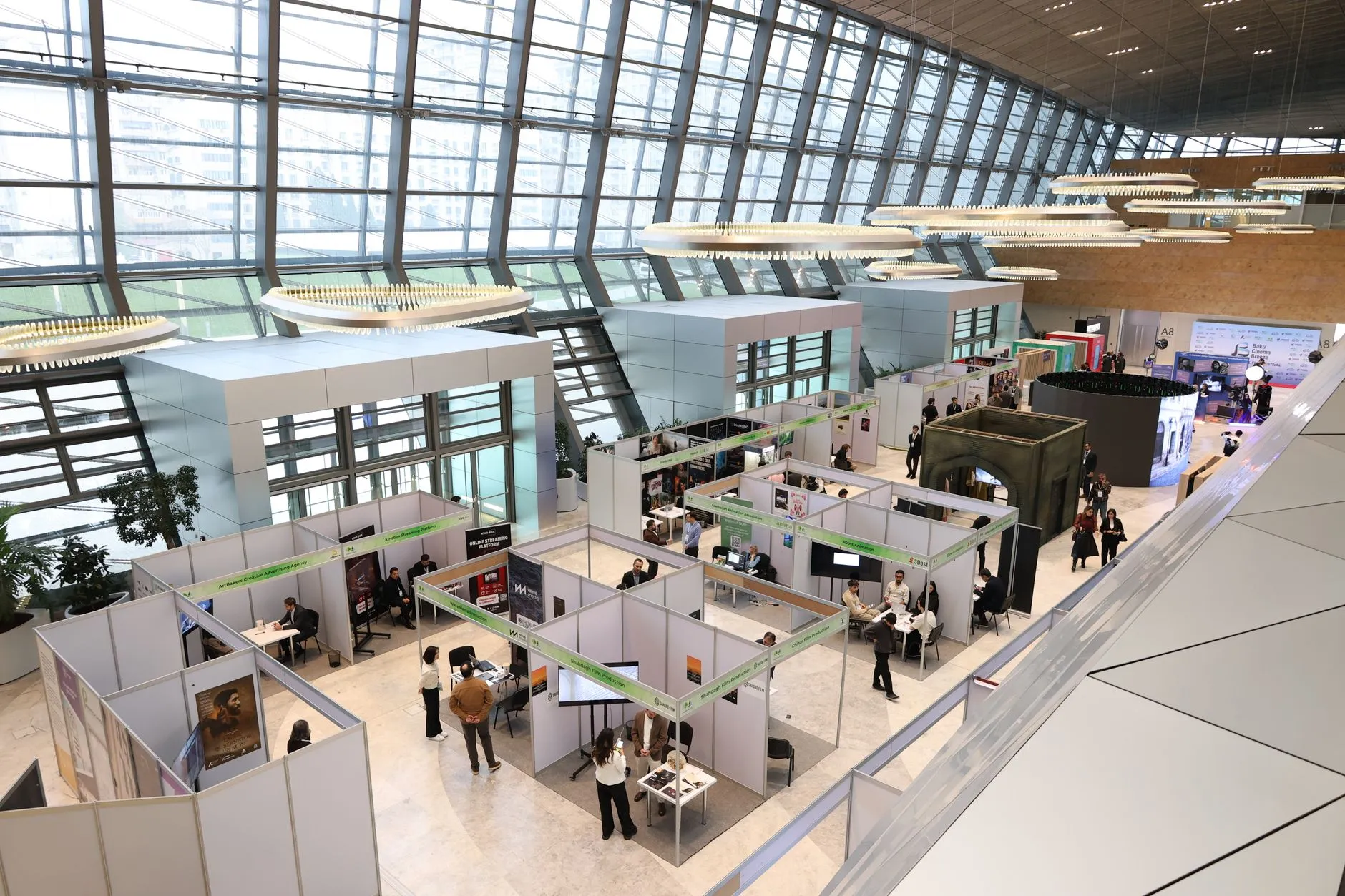
Short answer: Event IT support in Hong Kong fails on lead times and venue rules, not on technology. Order the venue circuit when you sign the booth contract, keep payments off shared Wi-Fi, stage and test every device before bump-in, and put an engineer in the booth on opening day. At Brocent's published Hong Kong dispatch rate (US$98 first hour, US$78 thereafter) a three-day fair is about US$3,220 of engineer time before after-hours uplift.
What does "event IT support" actually cover?
Event IT support is the technology work around a fixed-date, temporary site: a three-day trade-fair booth at a convention centre, a two-week pop-up store in a mall, a product launch or a roadshow. The work is the same in every case, and it is almost all in the days before the doors open:
- Connectivity. A wired line ordered from the venue, a cellular backup, and a booth network that does not depend on either alone.
- Payments and point of sale. Terminals, tablets or laptops that take money or orders, and what happens when the link drops.
- Demo devices. Laptops, phones, screens and kiosks that are imaged, locked down and ready to show.
- Lead capture. Badge scanners or forms that collect visitor details, and where that data goes afterwards.
- People. Someone on the floor who can fix a problem in minutes, not a help desk that opens a ticket.
- Teardown. Wiping, counting and returning everything, usually by a hard deadline at night.
It is a project with a hard deadline and no second chance, which is why a brand's regular IT support rarely covers it well: the contract was written for the office, not for a venue. For the managed side, see Brocent's field IT dispatch service; for the published prices, see the dispatch and on-site rates page. If the Hong Kong office itself is on a Managed IT plan, event days are priced as dispatch on top of it: see the published Hong Kong plan prices and build a quote.
If the retail side of your business runs year-round tills and stores, the related guide on retail POS IT support in Hong Kong covers the permanent-store version of the same problems.
What do you need to know about the venue's rules?
Every venue has its own rules, and they are the single biggest source of surprises. We do not publish a specific venue's deadlines or prices here, because they change by venue and by event; read the organiser's current exhibitor manual and the venue's services order form instead. The patterns to look for are the same everywhere:
- Circuit and Wi-Fi ordering has a deadline. Venues usually sell internet, power and water to exhibitors through an order form, with a cut-off date after which orders cost more or cannot be taken. Find the form on the day you sign the booth contract, not the week before.
- You may not be allowed to install your own. Some venues restrict who can run cabling, bring in access points or use certain wireless bands, because the hall is shared with hundreds of other exhibitors. Check what you may bring.
- Electrical and rigging are often exclusive services. Power drops, floor boxes and anything fixed to a ceiling or truss are typically ordered through the venue's approved contractors.
- Bump-in and bump-out windows are fixed. You may have a few hours to build and a few hours to clear. Plan the IT work to fit those windows, with the network and power in place before anything else is mounted.
- Pop-up sites have a landlord, not an organiser. In a mall, ask the management office what is already in the unit (a data point, a distribution board) and what they will not allow.
Put the venue's order form, the exhibitor manual and the build schedule in one folder that both your team and your IT provider can see. The most common avoidable failure is a booth that arrives with devices but no ordered circuit.
How should payments and POS work on a temporary site?
Treat the booth as a small shop with an unreliable network, and design so a dropped link does not stop sales.
- Do not rely on shared venue Wi-Fi for payments. It is shared with every exhibitor and visitor, congested at peak times, and outside your control. Use a wired line ordered for your booth, with a separate network for payment devices.
- Add a cellular backup. A router with a data SIM, or a second carrier, so a failure of the venue line does not close the till. Test it in the venue before opening, since signal inside large halls can be poor.
- Know what each terminal does offline. Some payment terminals and POS apps can queue transactions and settle later; some cannot. Ask your payment provider, in writing, what is supported and what the limits are.
- Keep payment devices on their own network. Do not put terminals on the same network as visitor Wi-Fi, demo laptops or lead scanners.
- Have a plan B that is not technology. A paper order form, a stock of printed receipts, or a second tablet already logged in.
We make no statement here about payment-card compliance for any specific setup. Payment security requirements depend on your acquirer and the equipment you use, so confirm them with your payment provider. For the permanent version, with store networks and tills, see how a Hong Kong retail chain chooses IT support.
How do you prepare demo devices, displays and lead capture?
Demo devices are the part of the booth visitors touch, and the part that most often embarrasses a team on day one.
- Image and lock them centrally. Build every demo laptop, tablet and phone from the same image or profile, with only the apps and content needed. Enrol them in device management so they can be locked, located and wiped remotely.
- Remove everything personal and everything sensitive. No staff accounts, no saved passwords, no real customer data in a demo environment. Use demo tenants and sample content.
- Set a kiosk mode where visitors will use the device. Restrict it to the demo app, disable system settings, and make it restart into the demo if it crashes.
- Tag and count. Label each device with an asset tag, record serial numbers before shipping, and keep a handover sheet. The same sheet is used at teardown.
- Test displays and screens on site, in the booth lighting. A screen that looked fine in the office can wash out under hall lighting.
- Have spares. A spare charger for every type, and at least one spare of each critical device, already imaged.
- Check insurance. Ask who is liable if a demo device is stolen from a stand; the organiser and venue usually exclude it.
What about visitor data collected at the booth?
If you scan badges or take sign-ups, you are collecting personal data from visitors. Tell people what you will use it for, collect only what you need, and decide before the event who will hold the list and for how long. In Hong Kong the Personal Data (Privacy) Ordinance applies; for the practical points when a provider handles your systems, read the PDPO compliance checklist for IT outsourcing in Hong Kong. This is general information, not legal advice.
What does the bump-in day plan look like?
A calm opening day is built on a rehearsed bump-in. A workable order of work:
1. Before shipping: stage and test everything. Image devices, load demo content, configure the booth router and payment network, and run the full set up in your office or the provider's lab. Pack it in labelled cases in the order you will unpack it.
2. Bump-in, first hours: infrastructure. Confirm the power and the ordered line are live, mount the router and switch, bring up the booth network, test the cellular backup.
3. Then devices. Place displays, connect demo devices, pair printers and scanners, run a test transaction on every payment terminal.
4. Walk the booth as a visitor would. Tap every demo, scan a badge, print a receipt, switch to the backup line and confirm sales still work.
5. Document. Take photos of the cabling and the network layout, and write the passwords and escalation numbers on a card kept in the booth.
6. Hand over to the on-floor engineer with a short list of what is likely to break and what to do about it.
The rehearsal is the step teams skip. If you cannot stage the booth beforehand, you are testing in front of customers.
Do you need an engineer in the booth during opening hours?
For a multi-day fair with payments or live demos, yes, at least on the first day. The cost of one engineer is small compared with a booth that is down during peak footfall. Options, using Brocent's published models:
- Pay per dispatch. An engineer visits when you raise a request and you pay after the job. Brocent's published 2026 H2 reference rate for Hong Kong is US$98 for the first hour and US$78 for each additional hour (Level 1 end-user support, next business day, 9×5, fully loaded, tax exclusive). A three-hour visit is US$98 + 2 × US$78 = US$254.
- Engineer on the floor for the show. An engineer is assigned to the booth for the opening hours. Brocent's Hypercare IT support describes an intensive, short-term engagement for go-lives and high-stakes business events, with engineers physically embedded at your site, a dedicated escalation line and daily briefings.
- Remote standby plus dispatch. A named contact on call for the show, with an engineer sent if a fault cannot be fixed remotely. It is the cheapest option and the slowest to react.
Brocent's dispatch service describes a 4-hour emergency arrival or next-business-day arrival as its two standard windows, and the arrival time is contractual. A fair is not a place for next-day arrival, so agree an event-specific window in writing before the show.
What would a three-day fair cost at the reference rates?
This is arithmetic on the published rates, not a quote. Assume an engineer for a half-day on bump-in day, ten hours on each of three show days and a half-day at teardown:
- Bump-in, 6 hours: US$98 + 5 × US$78 = US$488.
- Each show day, 10 hours: US$98 + 9 × US$78 = US$800; three days = US$2,400.
- Teardown, 4 hours: US$98 + 3 × US$78 = US$332.
- Total at the reference rates: US$3,220.
The reference rate is for standard weekday hours. Evening, weekend and holiday work is billed at an after-hours multiple that is not published on the rates page, and event days often run outside office hours, so ask for the multiple in writing. Multi-day or multi-event programmes are quoted separately, and the rates fall at higher volumes.
How does teardown work, and who wipes the devices?
Teardown happens at night against a hard deadline, which is when things get lost.
- Count before you pack. Use the same sheet you used at bump-in and check every asset tag and serial number.
- Wipe or reset demo devices. Remove demo content and any data created during the show, then return the devices to a clean state. Do this remotely through device management if you can, so it still happens if a case is delayed.
- Export and secure the leads. Move the visitor data from scanners and forms to the agreed system, then delete it from the scanner.
- Return or ship. Pack in the same labelled cases, photograph the packed cases, and keep the courier receipts.
- Close the loop the next morning. Reconcile the count, report anything missing, and write down what to change for the next event.
If the devices are rented, the rental company's return conditions apply on top of this. Check them before the show.
Case study: a three-day fair for a consumer brand
Illustrative scenario, not a named client. The Hong Kong arm of an international consumer brand books a three-day booth at a convention centre. It ordered the venue line two weeks before the show, staged twelve demo tablets and two payment terminals in its office, and rehearsed the bump-in. On the opening morning the venue line was live, but a cellular backup test showed weak signal on the hall floor, so the engineer moved the router near a window and added a second carrier. On day two the main line dropped for twenty minutes; sales continued on the backup. At teardown the asset sheet showed one tablet missing, which was traced to the cleaning crew within the hour, because the count was done before packing.
How do venue services, an event AV contractor and managed IT compare?
- Venue services only. Internet, power and basic technical help ordered from the venue. It is simple and the venue knows its own network, but support is generic, response depends on the venue's staffing, and nobody owns your devices, payments or data.
- Event AV contractor. Strong on screens, sound, lighting and staging. Usually weaker on endpoints, payment networks, device management and data handling, because those are outside AV scope.
- Managed IT with event hypercare. A provider that already supports your IT adds an engineer to the event, with the same device standards, escalation path and reporting as the office. It costs more than venue services alone, and it is the only option that owns the whole chain from device image to teardown.
Many events use a mix: the AV contractor for the stage, the venue for the line, and the IT provider for everything the booth staff actually touch. Decide who owns each part before the event, and write it down.
Frequently asked questions
How early should we order internet at a venue?
As soon as you have the booth contract. Venues usually sell connections to exhibitors through an order form with a cut-off date, after which orders cost more or cannot be taken. Read the exhibitor manual for the actual deadline, because it differs by venue and event.
Can we use 5G instead of the venue's line?
As a backup, yes; as the only connection, we would not. Signal inside large halls can be weak and congested when thousands of visitors are present. Test the cellular connection inside the booth before opening, and treat it as a second line, not a replacement.
Who wipes the demo devices after the show?
You do, or your IT provider does on your behalf. Wipe or reset every demo device before it leaves the venue or the same day it returns, ideally through device management so it can be done remotely. Record the serial number and time on the handover sheet.
What if the point of sale goes down during the show?
Switch to the backup connection, and if the terminal supports offline mode, continue and settle later. Keep a non-technology fallback such as a paper order form. Ask your payment provider in advance which offline modes are supported, because it varies by terminal.
Do we need an engineer on site all day?
For a multi-day fair with payments or live demos, we recommend one at least on the first day and at peak times. For a short single-day event with simple equipment, a remote standby contact plus a dispatch agreement may be enough.
Can the same team cover events in Macau or Singapore?
Brocent publishes dispatch reference rates for more than 40 countries, including Singapore, and coverage in other markets is quoted on request. Confirm the response window and the engineer's languages for each location in writing.
How much does event IT support cost?
At Brocent's published 2026 H2 reference rates for Hong Kong (US$98 first hour, US$78 each additional hour, Level 1, standard hours, fully loaded, tax exclusive), a ten-hour show day is US$800 and a three-day fair with bump-in and teardown is about US$3,220. After-hours multiples, device rental, courier and venue charges are extra, and rates for larger programmes are quoted separately.
Next steps
Start with the venue's order form and the build schedule, then decide who owns the line, the payments, the devices and the teardown. To see the published rates for the show days, open the dispatch and on-site rates page; to book an engineer or a standby arrangement, read about field IT dispatch or Hypercare, and talk to a Brocent consultant. If the office behind the booth needs a plan as well, price the Hong Kong office on the homepage quote tool and add the show days as dispatch.
Share:
Ready to take action?
Turn these insights into a roadmap for your business.
Book a 15-minute no-obligation consultation with our APAC IT experts. We'll review your current setup and provide a tailored IT roadmap within 24 hours.
Related services
Free Checklist
10 Critical Checks Before Expanding IT to Greater China
PIPL compliance, network segmentation, bilingual helpdesk setup, and more — everything your IT team needs before Day 1 in China.
Request the checklist →📬 Monthly Asia IT Insights
China compliance updates, cybersecurity alerts, and IT tips for APAC teams — once a month.
No spam. Unsubscribe anytime.
Related Articles
Sep 29, 2026
When the Till Won't Take Cards: Retail POS IT Support for a Hong Kong Concession Counter
Aug 08, 2026
Best IT Support Company in Hong Kong? A Retail Chain's Story

Sep 17, 2026
After the Wi-Fi Installation Is Signed Off, Who Runs It? A Hong Kong Retail Chain's Wireless Network Solution