B BROCENT Get a quote
Managed network operations · Hong Kong · Singapore · offshore sites

Managed network operations, priced per device

Your firewalls, switches, wireless access points and UPS are watched around the clock from our operations centres. Engineers fix what can be fixed remotely, a local engineer goes on site when it cannot, and every month you get one report that shows what happened.

  • 24×7 monitoring and alerting on every device you hand over
  • Remote operations in business hours: backups, policy checks, logs, accounts, troubleshooting
  • Monthly inspection report, availability report and incident log
  • Onsite visits by local network engineers, bought as a yearly allowance
FromUS$4.50per access point per month for the first 20, US$4.28 for the 21st to 60th, and US$4.05 from the 61st. Core network and security devices from US$47.47; minimum monthly fee US$99.One price list in US dollars for every country; HK$, S$ and RMB shown at the 2026-11-06 rate. Excl. tax. Valid until 2026-12-31.
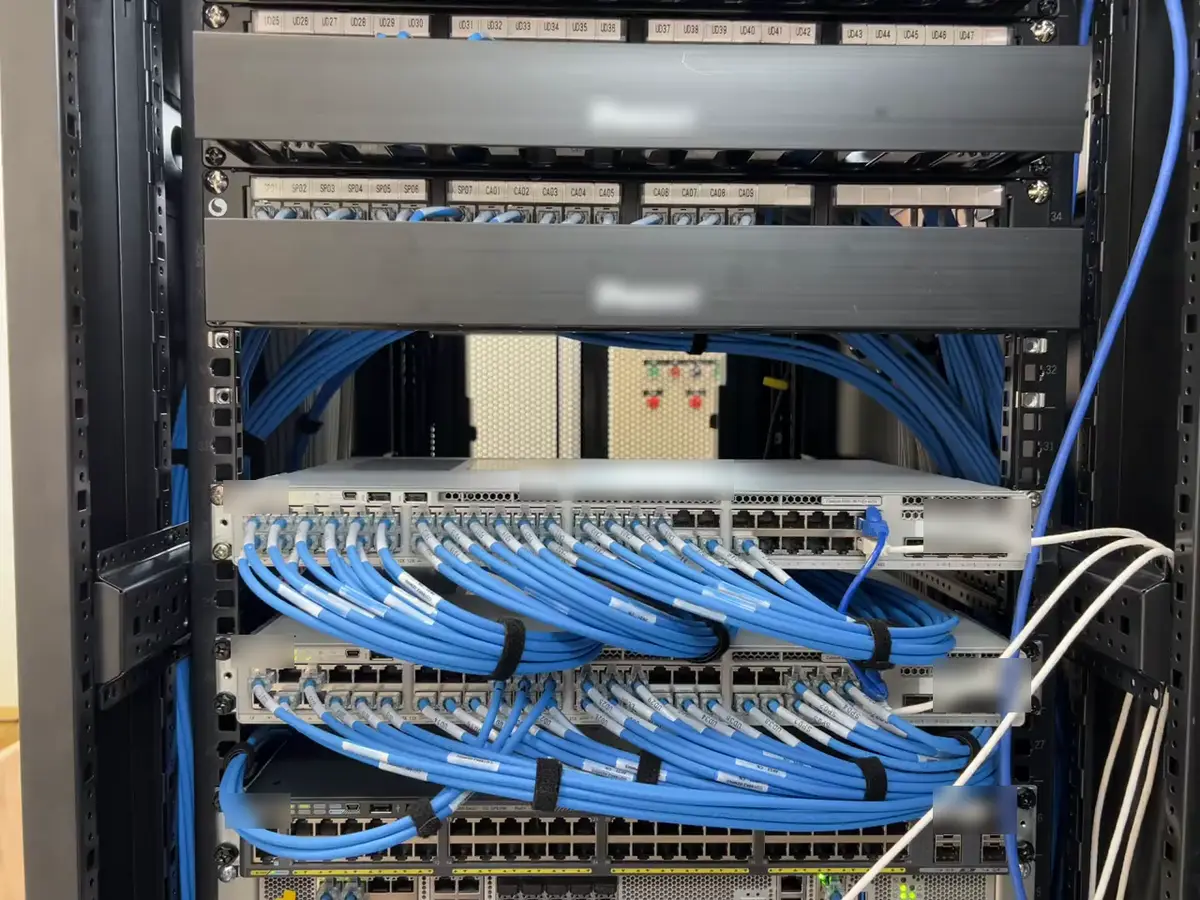
Labelled blue patch cables dressed from the patch panels into the access switches of a network rack.Video
Labelled blue patch cables dressed from the patch panels into the access switches of a network rack.
Per device24×7

What every device gets

The same four things for each device, whether you hand over 6 or 60.

  • 24×7 monitoring: up/down, interfaces, CPU, memory, temperature, power
  • Alerts: email for routine events, a phone call for critical ones
  • Configuration backups, stored off the device
  • Firmware and policy checks against the vendor's current advice
  • Log export and account maintenance on request
  • Remote troubleshooting during business hours
  • Monthly inspection report, availability report, incident log
  • Local engineer on site from your yearly allowance
01

What managed network operations means, and what network maintenance services usually leave out

Most network maintenance services in Hong Kong and Singapore are sold one of two ways. One is break-fix: you call when something stops working and pay for the visit. The other is a monitoring tool licence: a dashboard turns red, and someone in your office has to notice and act. Managed network operations sits between the two. A team outside your company watches every device all the time, acts on what it sees, keeps records, and sends an engineer when hands are needed.

That is what a network operations center (NOC) does for a telecom carrier or a bank. Smaller companies need the same discipline on a few dozen devices. They do not need their own NOC: a 10-person office with two firewalls and eight switches cannot staff a night shift, and should not try.

We price the service per device because devices are what we look after. A firewall, a switch, a wireless access point and a server-room UPS each count as one device. Your fee follows the size of your network, not the number of people in the office. When you add a floor or a branch, you add devices; nothing else in the contract has to change.

It does not cover hardware failure. If a switch, a UPS or a physical server fails, we diagnose it remotely and tell you what failed. We then contact the manufacturer's warranty for you, or, if you have bought third-party hardware maintenance, the maintainer, and help them deliver the repair. If you need spares and onsite repair from us, that is our IT hardware maintenance service.

Included in the device fee Not included (separate service)
24×7 monitoring and alertingHardware failure itself: we liaise with the warranty or your maintainer
Remote operations in business hoursNew equipment, licences and subscriptions
Configuration backup and change recordsStructured cabling and physical moves
Monthly inspection, availability and incident reportsProject work: new sites, redesigns, migrations
Escalation to carriers and vendors on your behalfOnsite hours beyond your yearly allowance
02

A day of operations: from alert to monthly report

Every event follows the same path, so the record in your monthly report matches what actually happened.

  1. 01Alert

    The monitoring platform checks each device every minute. A device stops answering, an interface flaps, a UPS goes on battery.

  2. 02Ticket

    An alert becomes a ticket with a time stamp. Routine events go to you by email; critical ones get a phone call.

  3. 03Remote fix

    During business hours an engineer logs in, checks logs and configuration, and fixes what can be fixed remotely.

  4. 04Onsite

    If hands are needed, a local engineer visits from your yearly allowance, with the diagnosis already done.

  5. 05Report

    Each ticket ends up in the incident log. Repeat problems become a recommendation in the monthly report.

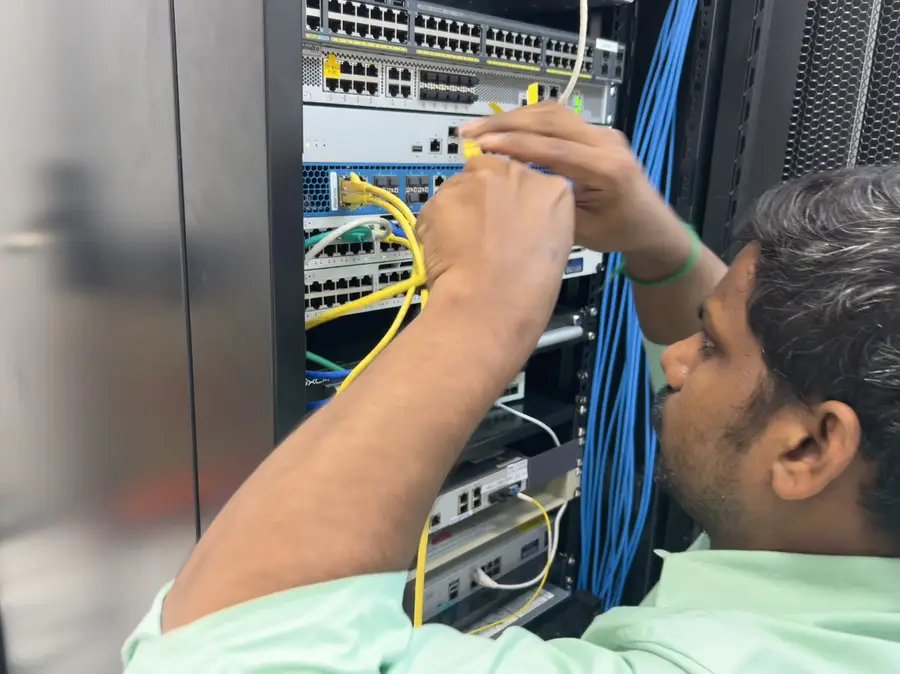
An engineer re-patching cables at the front of a network rack.Video
An engineer re-patching cables at the front of a network rack.

Who hears about what

Routine eventEmail to your IT contact, logged as a ticket
Critical eventPhone call to the named contact, then email
Carrier line faultWe call the carrier with your account details
Hardware failureDiagnosis report, then onsite swap if you approve
Response targets use our published tiers, chosen when you sign: Essentials 1 hour, Business 30 minutes, Premium 15 minutes 24×7. Stricter targets are agreed per project. Definitions and credits are on the SLA page.
03

Run from our operations centres, with engineers in the countries where your network is

Offshore network operations works when remote work and local hands are planned together. Our operations centres and the countries where we already work with customers are listed on two pages:

Service desk languages: English, Mandarin and Cantonese; Japanese from the Tokyo team.

Operations centres Locations and site counts

One operation, several centres, every time zone

Our centres do not each run their own night shift for their own customers. They work together as one operation, so a network in one country is covered by centres in other time zones as the day moves. The diagram shows where the centres sit; it is not a duty roster.

UTC−8UTC−4UTC+0UTC+4UTC+8UTC+1212345 Joint operations · shared monitoring and records
  1. 1United StatesUTC−5
  2. 2WarsawUTC+1
  3. 3Bangkok · Ho Chi Minh CityUTC+7
  4. 4Guangzhou · Hong Kong · SingaporeUTC+8
  5. 5TokyoUTC+9
Operations centres by time zone (UTC). Centres act jointly on the same monitoring and ticket record.
04

Priced per device, one price list worldwide

Each device type has its own monthly price in US dollars, the same in every country, and the price steps down as you add more. Add or remove a device and your fee changes by that device's price.

From, per device per month

USDHKDSGDCNY
Core network and security devicesFirewalls, routers, core switches, wireless controllers, VPN, WAF, IPSUS$47.47HK$372S$60.8RMB¥317
Access switchesUS$23.20HK$182S$29.7RMB¥155
Wireless access pointsHosted controller includedUS$4.50HK$35S$5.8RMB¥30
UPS unitsEnvironment sensors and PDUs count with their UPSUS$21HK$165S$26.9RMB¥140
Virtual serversUS$150.04HK$1,176S$192.3RMB¥1,003
Physical serversUS$270.08HK$2,117S$346.1RMB¥1,806

Each device type has its own price, with lower rates as you add more. Minimum monthly fee US$99.

Prices in US dollars, the same in every country. Hong Kong dollar, Singapore dollar and renminbi figures use the 2026-11-06 exchange rate (HK$ and RMB rounded to whole units, S$ to one decimal). The prices on this page and your quotation are the prices that apply. Valid until 2026-12-31. Available on its own or with a Managed IT plan. All published prices exclude tax; taxes are added at the applicable rate. Invoices are in US dollars by default, or in local currency on request.

Open the full price table and estimator
Onsite visits are not in this fee. You buy them as a yearly allowance, priced from our dispatch rates for your country.
Response targets use our published tiers; see the SLA page. Price assumptions and taxes: price assumptions.
05

Your monitoring tool, or ours

Many customers already have a monitoring platform, often set up by the integrator who built the network. We can work inside it under your access rules, so alerts and history stay in one place. If you have nothing, we monitor with our MSP monitoring platform and give you read-only access.

You already have a tool

  • We get named accounts with the permissions you approve
  • Alert rules are reviewed and tuned in the first month
  • Your history and dashboards stay where they are
  • Leaving us does not mean migrating tools

You have no tool

  • We deploy collectors or agents during onboarding
  • 10+ global checkpoints and 1-minute checks (platform capability)
  • Read-only dashboard for your team
  • On exit, we hand over the monitoring data and remove agents

What we can watch

  • Network devices
  • Wireless access points and controllers
  • UPS and environment sensors
  • Servers, physical and virtual
  • Internet lines and VPN tunnels
  • Websites and SSL certificates
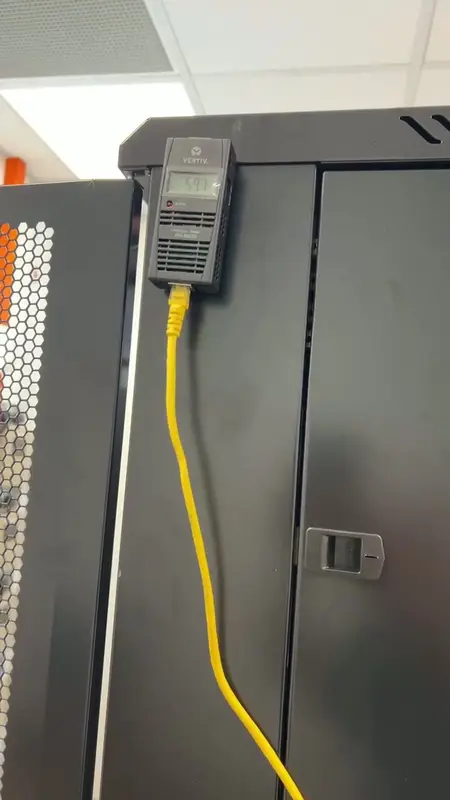
An environment sensor on top of a rack, part of server-room environment monitoring.Video
An environment sensor on top of a rack, part of server-room environment monitoring.
06

Onboarding in four steps

A single-site network can usually start within a week of signing. Multi-site or undocumented networks take two to four weeks. We confirm the date after we have seen the environment.

  1. 01

    Intake survey

    Device list, access, contacts, current problems and what is not documented.

  2. 02

    Deploy monitoring

    Collectors or agents, or accounts in your existing tool.

  3. 03

    Set thresholds

    Alert levels and who gets called for what, agreed with you.

  4. 04

    Go live

    Remote operations start; the first monthly report follows the first full month.

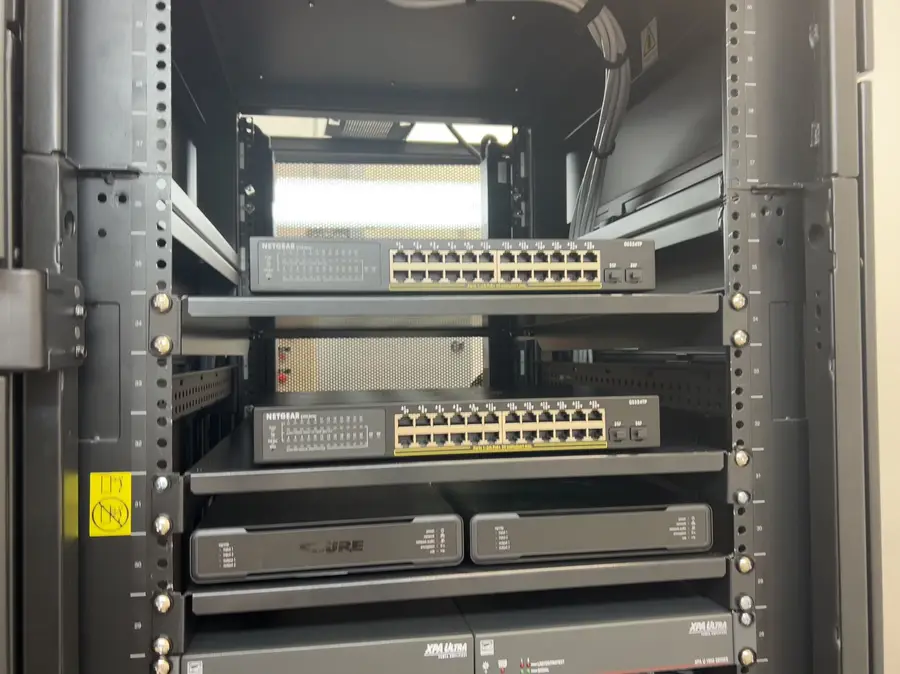
Switches and patch panels mounted inside a network rack.Video
Switches and patch panels mounted inside a network rack.

What the intake survey records

  • Every device: model, firmware, location, owner
  • Current configuration, backed up before we touch it
  • Lines and carriers, with account numbers
  • Known problems and who usually fixes them
  • Spare parts on site, if any
07

New office or new plant: the team that checks the build runs the network

When a network is being built, we can act as your technical lead on your side: implementation plan, review of supplier designs, migration plan, cabling acceptance, switch configuration and monitoring set-up. The contractor keeps supply and installation. On go-live day the network moves straight into operations with the same people, so nobody has to learn it from scratch.

  1. 1Plan and standards
  2. 2Supplier design review
  3. 3Cabling acceptance
  4. 4Configure and monitor
  5. 5Run

Professional services and project rates

08

What the monthly report looks like

Three parts, one document. This is a sample with invented data; your report uses your device names.

BROCENT · Network reportOct 2026 · SAMPLE
Device groupAvailabilityIncidents
Core firewall pair100.00%0
Floor switches (8)99.98%1
Wireless APs (24)99.91%3
Server-room UPS100.00%0
Internet line A99.72%1
Sample monthly network report, page 1. Invented data.p.1/6
Availability
Uptime per device group for the month, measured by the monitoring platform, with the number of incidents behind each figure.
Incident log
Every ticket: when it started, what happened, what we did, and whether it used onsite hours.
Inspection
Firmware levels, configuration backups, capacity trends and the changes we recommend for next month.
Recommendations
Problems that keep coming back are listed with a proposed fix, so they get solved rather than logged again.
See a published sample availability report
09

Access, change control and data

Named accounts only

Every engineer uses a personal account; shared admin passwords are rotated at handover.

Changes on record

Each change has a ticket, a reason and a configuration backup before and after.

Maintenance windows

Firmware and risky changes run in windows you approve.

Your data stays yours

Configurations, logs and reports belong to you and are handed over on exit.

Clean exit

On exit we remove agents, close our accounts, hand over data and delete our copies.

Certification

Brocent is ISO/IEC 27001 certified. Certifications of the monitoring tool vendor belong to that vendor and are not claimed as ours.

10

Network operations we have delivered

Paid, delivered work. Customer names, addresses and prices are left out.

Hong Kong · Investment firm · since 2021Delivered

A new office network, monitored from day one and supported since

Scope
Office move: next-generation firewalls, PoE switches, Wi-Fi access points, a rack UPS and an environment sensor, all connected to monitoring from day one.
Since
The monitoring subscription was renewed; prepaid preventive support for servers, network and security followed, with quarterly asset and configuration reviews.
Delivered
Configured network, monitoring and its renewal, prepaid preventive support.
Hong Kong · Office of a mainland-headquartered group · since 2023Delivered

Server room and office network looked after for a holding company's Hong Kong office

Scope
A small set of routers, firewalls and switches, the UPS and IP phones in the server room; the leased line to head office; the office desktops and meeting-room systems.
Work
Firewall software kept current, access policies maintained, router and switch configuration changed on request, coordinated with head-office IT.
Delivered
Prepaid support hours renewed in 2024 and 2026.
Mainland China · Three manufacturing plants · since 2024Delivered

24×7 infrastructure monitoring and remote support for industrial component plants

Scope
Monthly managed service for three plants: 24×7×365 infrastructure monitoring, remote support in business hours, onsite visits billed by the hour.
Also
Inventory, patch, log and account management, and a monthly executive report.
Delivered
Monthly service: one plant since 2024, two more since 2025; ongoing.
Mainland China · Beijing office of a foreign energy company · 2019–2021Delivered

Network monitoring and prepaid support for a foreign company's Beijing office

Scope
Monitoring of up to 50 network ports, including the router, switch, security appliance and server; monthly service management.
Work
Service requests from the local office and the global IT team, approved by the customer before work started.
Delivered
Three years, renewed each year.
Mexico · Automotive parts manufacturerAwarded · starts Dec 2026

Contract awarded: network operations from December 2026

More delivered work on our case studies page

Global financial services firm · Beijing and Hong Kong · NOC and network
Global telecom infrastructure provider · 24×7 support in 68 countries
Regional telecom and media operator · service desk and NOC
11

Managed network operations, an in-house engineer, or break-fix?

No prices here, because the right answer depends on how many devices and sites you have. This is how the three options differ in practice.

Managed network operationsOne in-house network engineerBreak-fix call-outs
Nights, weekends, leaveCovered by the operations teamNot covered unless you pay overtimeOnly when you call
Who notices a faultMonitoring, within minutesThe engineer, if on dutyYour users
Records and reportsMonthly, standard formatDepends on the personAn invoice per visit
Sites in other countriesLocal engineers, one contractTravel or local hiresA different supplier per country
Cost followsNumber of devicesHeadcountNumber of incidents
12

Managed network operations: questions we are asked

What is the difference between managed network operations and network maintenance services?

Network maintenance services often means break-fix visits or a hardware support contract. Managed network operations adds 24×7 monitoring, remote work every business day, records of every change and a monthly report. Onsite visits are part of it, but they are the last step, not the whole service.

How much does managed network operations cost?

Each device type has a published monthly price in US dollars, the same in every country: core network and security devices from US$47.47, access switches from US$23.20, access points from US$4.50 with the hosted controller included, UPS from US$21, virtual servers from US$150.04 and physical servers from US$270.08. Volume tiers are graduated and the minimum monthly fee is US$99. The full table and an estimator are on the pricing page.

Which devices do you look after?

Firewalls, routers, switches, wireless access points and controllers, UPS units and environment sensors, and servers if you add them. We have run networks built on Fortinet, Palo Alto, Cisco and Meraki, Aruba, UniFi and SonicWall equipment, among others. We work with the brand you have.

Who watches the network at night and at weekends?

Our operations centres work as one team across time zones, so monitoring and alerting never depend on a single office being open. Critical alerts reach your named contact by phone. Remote changes run in business hours unless you choose 24×7 response.

What happens if a device fails at 3 a.m.?

The alert is raised within minutes and becomes a ticket. A critical event is phoned through to your contact. We check what can be checked remotely, and if hardware has failed, a local engineer visits under your onsite allowance with the diagnosis already done.

Are onsite visits included?

Onsite visits are bought as a yearly allowance next to the device fee, priced from our dispatch rates for your country. That keeps the monthly fee low for networks that rarely need hands on site, and keeps extra visits predictable for those that do.

Can you work with our existing monitoring tool?

Yes. We can work inside your platform with named accounts and permissions you approve. If you have no tool, we monitor with our MSP platform and give you read-only access.

Do we need a Managed IT plan to buy this?

No. Network operations can be bought on its own. If you also have a Managed IT plan, the plan covers monitoring of user endpoints and cloud services, and infrastructure devices are billed per device here, in the same agreement and the same monthly report.

What languages does your service desk speak?

English, Mandarin and Cantonese. Our Tokyo team works in English and Japanese.

How long does onboarding take?

A single-site network can usually start within one week of signing. Multi-site networks, or networks with no documentation, take two to four weeks. We give a firm date after the intake survey.

What is in the monthly report?

An availability report per device group, the incident log with every ticket and what was done, and an inspection section covering firmware, configuration backups, capacity and our recommendations.

Do you repair or replace hardware?

Hardware failure itself is outside this service. We diagnose the fault, contact the manufacturer's warranty for you or your third-party maintainer, and support the repair. Spares and onsite repair are available from our IT hardware maintenance service.

Which certifications do you hold?

Brocent is ISO/IEC 27001 certified. Certifications listed by the monitoring tool vendor belong to that vendor, and we do not present them as ours.

How do we leave, and what happens to our data?

Agreements run for at least a year with 30 days' notice, as set out in our managed IT services agreement. On exit we hand over configurations, monitoring data and reports, remove our agents, close our accounts and delete our copies.

Do you cover sites outside Hong Kong and Singapore?

Yes. Operations are remote, and onsite visits are made by local engineers in the country. Our locations page lists the countries where we already work with customers.

Can you take over a network another company built?

Yes, and it is the most common case. The intake survey records what is there, backs up every configuration before we change anything, and lists what is undocumented.


14

Who wrote this page

L.J. Yu
Chief Operating Officer
L.J. Yu

Runs service delivery and regional operations across Asia, including the operations centres that monitor customer networks.

Rogue Yu
IT Service Delivery Director, vCIO
Rogue Yu

Owns the quality checks behind our monthly reports and incident records.

Send us your device list. We will send back the monthly fee for each device.

A spreadsheet or a photo of the rack is enough to start. Hong Kong +852 6741 7227 · Singapore and other countries: accounts@brocent.com

Related pages for this service