Microsoft 365 security audit and assessment — fixed price, CIS Benchmark
Microsoft's Secure Score is free, but it only sees API-visible settings and is not an audit. Brocent runs a full CIS Microsoft 365 Benchmark audit across Entra ID, Defender, Purview, Exchange, SharePoint and Teams, including the manual controls Secure Score can't check — delivered remotely to tenants in any country. You get a prioritised remediation roadmap plus evidence for the questions that cyber-insurance questionnaires and Cyber Essentials commonly ask. One fixed price by headcount, from US$450 for up to 10 users.
Reviewed by Jack Zhang, CISSP & Rogue Yu, CISSP
Year-end IT budget offers · Valid through 31 December 2026
Microsoft 365 Security Audit — year-end discount
Full CIS Microsoft 365 Benchmark audit priced by headcount, list from US$450 (up to 10 users). Report in 5–7 business days.
15% off · from US$382.50 one-time · excl. tax
Promo code — quote it to your consultant:YE26-M365AUDIT
Microsoft 365 security audit pricing — one fixed cost by headcount
A single audit product with the same scope for every team size. Pick the band that matches your Microsoft 365 user count. One-time fee in US$, excluding tax.
1–10 users
List price $450 15% off
Year-end price
$382.50
Save $67.50
Valid through 31 December 2026
Price
$450
One-time assessment
11–25 users
List price $990 15% off
Year-end price
$841.50
Save $148.50
Valid through 31 December 2026
Price
$990
One-time assessment
26–75 users
List price $1,800 15% off
Year-end price
$1,530
Save $270
Valid through 31 December 2026
Price
$1,800
One-time assessment
76–150 users
List price $2,900 15% off
Year-end price
$2,465
Save $435
Valid through 31 December 2026
Price
$2,900
One-time assessment
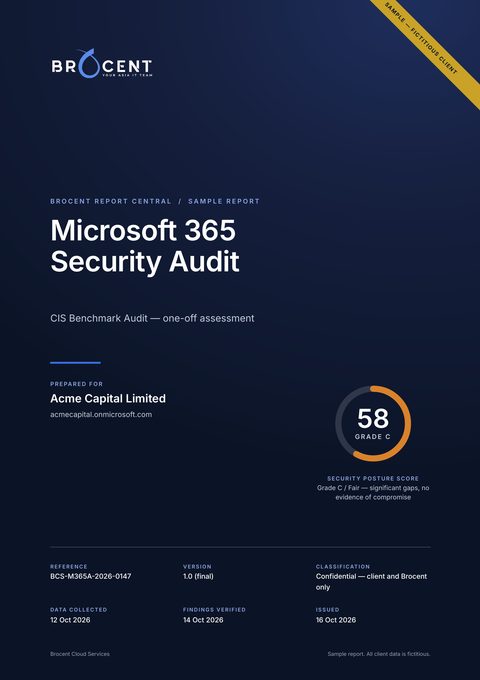 See what you receive A complete sample audit report for a fictitious client — findings, evidence and the fix plan — readable online. Read the sample audit report →
Included in every band
- Full CIS Microsoft 365 Benchmark, Level 1 and Level 2, including manual controls
- Entra ID, Defender, Purview, Exchange, SharePoint and Teams
- Evidence mapped to common cyber-insurance questionnaire and Cyber Essentials questions
- Prioritised remediation roadmap with effort estimates
- Written report in 5–7 business days after we get tenant access
- Debrief call to walk through the findings
Optional: managed monitoring
$6–10 / user / mo
Keep the result from slipping: continuous monitoring plus a quarterly re-audit, billed monthly per user. Not part of the year-end discount.
Prices are in US dollars, excluding tax, and are the same in every country: the fee is fixed by headcount, not by location. Invoicing in HKD, SGD, CNY, JPY or EUR is available on request.
What should a vulnerability assessment for Microsoft 365 and Exchange Online cover, and what does it cost?
A Microsoft 365 vulnerability assessment is a configuration review, not a network scan — there are no servers of yours to probe, so the scope is the tenant's settings and who can reach its data. Ours follows the CIS Microsoft 365 Benchmark (Level 1 and 2) and is the same engagement people search for as a Microsoft 365 security assessment. Every band checks the same three areas:
Identity (Entra ID)
- ›MFA coverage per user, including break-glass and service accounts
- ›Conditional Access policies and their exclusions; sign-in and user risk
- ›Privileged roles and phishing-resistant authentication for admins
- ›Legacy authentication and SMTP AUTH
- ›User consent to third-party apps and the permissions they hold
- ›Guest accounts and their expiry
Exchange Online & Defender for Office 365
- ›SPF, DKIM and DMARC on every domain, including parked ones
- ›External auto-forwarding and inbox rules
- ›Anti-phishing, anti-spam, Safe Links and Safe Attachments policies
- ›Mailbox auditing and unified audit log retention
SharePoint, OneDrive, Teams & data
- ›External sharing settings and anonymous "Anyone" links
- ›Sensitivity labels, retention policies and DLP for personal data
- ›Teams external access and third-party apps
- ›Personal phones and laptops that reach mail and files without app protection
Pricing is a fixed one-time fee by headcount — US$450 for 1–10 users up to US$2,900 for 76–150 users, quoted individually above 150 — not an hourly rate. It includes the written report with graded findings and evidence, the prioritised fix plan and a debrief call.
Need your own servers, firewalls or web applications scanned as well? That is the separate Vulnerability Scanning service.
Microsoft 365 security audit, assessment or review: what we check against
Audit, assessment and review are three names for the same engagement here: a read-only review of your tenant's settings, graded against recognised baselines, with a written fix plan. Four references sit behind the report, and each has a clear job:
CIS Microsoft 365 Foundations Benchmark
The record of the audit. Level 1 and Level 2, reported by section: admin center, Defender, Purview, Intune, Entra ID, Exchange, SharePoint, Teams and Power BI. Manual controls are included.
CISA ScubaGear baselines
A second, independent baseline run per service (Entra ID, Exchange Online, Defender, SharePoint and OneDrive, Teams, Power Platform), reported as pass, fail and warning.
Microsoft Secure Score
Used as the trend line, so you can see progress between audits. It reads only API-visible settings and is not the record.
Cyber Essentials requirements
A readiness table for what the tenant can evidence: secure configuration, user access control, malware protection and update management.
Read-only access: what we need, and what we never see
One of your Global Administrators approves our read-only audit application once. That is the whole access arrangement.
- Read-only Graph permissions only; nothing in them can change your tenant
- No Brocent account or password is created in, or shared with, your tenant
- Mail and documents are never opened: the audit reads configuration and metadata, not content
- You can remove the application in Entra ID (Enterprise applications) the day the audit finishes
The full permission list is in the FAQ below and on the sample report page.
What you receive, how long it takes, and what is not included
Timeline
- We confirm your headcount band and the fixed fee, normally within one business day.
- Your Global Administrator approves the read-only application (about 15 minutes).
- The automated scan runs in minutes; an engineer then checks the manual controls.
- You receive the written report 5–7 business days after access is granted.
- A debrief call walks you through the findings and the fix order.
Deliverables
- ›Written report with graded findings, evidence and effort for each
- ›CIS results by section and ScubaGear results by service
- ›Cyber Essentials readiness table and an insurer evidence pack with dated exports
- ›Phased, prioritised fix plan, plus an Excel workbook of every control
Included
- The audit, the report and the workbook
- The prioritised roadmap with effort estimates
- The debrief call
- One re-audit, when Brocent carries out the fixes
Not included
- Making the fixes: quoted as a fixed fee after the audit
- Microsoft 365 backup, penetration testing and phishing simulation
- Opening mail or documents, and third-party SaaS beyond its OAuth grants
- Firewalls and on-premises network equipment
See the exact format before you buy: read the full sample audit report (fictitious client; PDF and Excel versions available).
Microsoft 365 security audit UK: Cyber Essentials, UK GDPR and insurer questions
For UK organisations the audit is used most often for three things: preparing for Cyber Essentials, answering a cyber-insurance proposal form, and showing that personal data in Microsoft 365 is protected. The report is built for all three, and the debrief call is booked in UK business hours.
Prices are the same fixed US-dollar fees as everywhere else: US$450 for 1–10 users up to US$2,900 for 76–150 users, excluding tax, with no day rate. We publish one price list in US dollars; ask us if you need the quote in another currency.
- ›Cyber Essentials: the report includes a v3.3 readiness table for the Microsoft 365 view (MFA on cloud services, administrator accounts, unused accounts, secure configuration, malware protection, updates) and flags items that would fail an assessment. It is evidence for your assessment; the certification body makes its own decision, and firewalls are largely outside a Microsoft 365 review.
- ›UK GDPR: where a finding touches personal data, such as anonymous sharing links, mailbox forwarding to a personal address or no data loss prevention for identity documents, the report says so and rates it. It does not replace legal advice or a data protection impact assessment.
- ›Insurers: the evidence pack answers the questions proposal forms ask most (MFA, admin accounts, email security, endpoint protection, log retention) and points to a dated export for each answer.
Microsoft 365 security audit for US businesses: fixed price in US dollars
US buyers see the same fixed fee as everyone else, in US dollars and excluding tax: US$450 for 1–10 users, US$990 for 11–25, US$1,800 for 26–75 and US$2,900 for 76–150. Above 150 users we quote. The scope is the same in every band.
The audit is delivered fully remotely, so your office location does not matter. A Global Administrator approves the read-only application, and the report arrives 5–7 business days later.
- ›CISA ScubaGear: besides the CIS Benchmark, the report includes ScubaGear results per service, which gives you the public baseline published by the US Cybersecurity and Infrastructure Security Agency.
- ›Cyber-insurance applications: the evidence pack covers MFA, privileged accounts, email authentication (SPF, DKIM, DMARC), endpoint protection and log retention, each tied to a dated export. Every insurer sets its own rules, so we cannot promise what a particular one accepts.
- ›Client security questionnaires: use the findings register and the Excel workbook as the supporting record when a customer asks how your tenant is configured.
Larger tenants and guided hardening
Above 150 users, or when you want us to fix what the audit finds, we scope and quote the work individually. Every engagement is delivered by a named engineer, not a self-serve dashboard.
150+ users
Larger tenants · quotedThe same CIS Benchmark audit scope for tenants above 150 users, quoted as a fixed fee.
One-time assessment
Custom
Managed (recurring)
$6–10 / user / mo
- Same scope as the four headcount bands
- Fixed-fee quote based on your tenant and user count
- Multi-tenant and multi-region estates scoped individually
- Managed: monitoring + quarterly re-audit
Hardening & Compliance
Audit + guided remediationWe audit, then harden your tenant to Secure Score 80+ and keep it there.
One-time assessment
Custom
Managed (recurring)
Custom
- Everything in the CIS Benchmark Audit
- Guided remediation to Secure Score 80+
- Evidence for insurance and Cyber Essentials questions, refreshed after remediation
- Conditional access & DLP policy hardening
- Executive + board reporting
- Managed: continuous drift monitoring + monthly review
Is Microsoft Secure Score enough, or do we need a CIS Benchmark audit?
Microsoft Secure Score is a free, automated number based on the settings Microsoft's API can read. It's useful as a trend line — but it is not an audit. It misses manual-only controls (break-glass emergency-access accounts, Entra admin-role restrictions, Teams external-app policies, Power BI sharing).
The CIS Microsoft 365 Benchmark covers 100% of controls — including those manual ones — and is the recognised standard behind most compliance frameworks. A Brocent CIS audit gives you a report designed to be used as evidence when you answer a client's security questionnaire, a cyber-insurance questionnaire or a Cyber Essentials assessment, plus a roadmap to fix what's wrong.
Why a CIS audit beats a free score
The market splits into free automated scores, per-user monitoring SaaS, and consulting. Brocent gives you the defensible middle: an audit-grade CIS assessment at mid-market prices.
-
Microsoft Secure Score
API-visible settings only (not audit-grade) · Free
-
ScubaGear (CISA)
Open-source baseline, no interpretation · Free (self-run)
-
Posture-monitoring tools
Per-user posture monitoring SaaS · US$1–3 / user / mo
-
Enterprise governance platforms
Enterprise governance platform · From ~US$20,000 / yr
-
Enterprise consultancy
One-time hardening project · US$15,000–50,000
-
Brocent CIS Audit
Full CIS benchmark + roadmap · US$450–2,900 by headcount
Third-party list prices as of July 2026. Brocent runs ScubaGear and CIS tooling under the hood — you pay for the audit, interpretation and remediation, not the tool.
Microsoft 365 audit — pricing questions
Isn't Secure Score already free?
Yes, and we use it as a trend line — but it only reads API-visible settings, so it is not an audit-grade record. The CIS Microsoft 365 Benchmark covers every control, including the manual ones Secure Score can't see; you are paying for that evidence and the fix plan, not the score.
How is M365 audit pricing calculated?
There is one product, the CIS Benchmark Audit, priced once by headcount (US$, excluding tax): US$450 for 1–10 users, US$990 for 11–25, US$1,800 for 26–75 and US$2,900 for 76–150. The scope is identical in every band. Above 150 users, or if you want guided remediation (Hardening & Compliance), we quote individually. Year-end offer: all four bands are 15% off until 31 December 2026, which makes them US$382.50 / US$841.50 / US$1,530 / US$2,465. Optional managed monitoring is US$6–10 per user per month including a quarterly re-audit, and is not discounted.
What does the audit actually check?
Entra ID (MFA coverage, Conditional Access, admin roles, legacy authentication, app consent, guests), Exchange Online and Defender for Office 365 (SPF/DKIM/DMARC, forwarding, anti-phishing and Safe Links/Attachments policies, mailbox auditing), and SharePoint, OneDrive, Teams and Purview (external sharing, sensitivity labels, retention, DLP) — against the CIS Microsoft 365 Benchmark Level 1 and 2.
Do you fix the problems too?
The Hardening & Compliance tier includes guided remediation to Secure Score 80+ and hardens conditional-access and DLP policies. The audit itself hands you a prioritised roadmap your own team (or ours, on a managed plan) can execute.
Can I use the report for cyber insurance or Cyber Essentials?
The report includes evidence mapped to the questions commonly asked in cyber-insurance questionnaires and Cyber Essentials assessments, and it is designed to be used as evidence in those processes. It does not by itself make you compliant or certified; the insurer or certification body makes its own decision.
What is the difference between a Microsoft 365 security audit, assessment and review?
In practice nothing: all three describe a configuration review of your tenant against a baseline. Ours is a read-only audit against the CIS Microsoft 365 Benchmark and the CISA ScubaGear baselines, delivered as one written report and fix plan for one fixed fee. We do not run a lighter assessment at a different price.
What does a Microsoft 365 security audit cost in the UK or the US?
The fee is fixed by headcount, not by country: US$450 for 1–10 users, US$990 for 11–25, US$1,800 for 26–75 and US$2,900 for 76–150, in US dollars and excluding tax. Above 150 users we quote individually. There is no day rate.
Does the audit cover UK GDPR?
It covers the Microsoft 365 settings that decide whether personal data is protected: external sharing, forwarding, data loss prevention, sensitivity labels, retention and access control. Where a finding bears on personal data, the report says so. It does not open your files, and it is not legal advice or a data protection impact assessment.
How does the audit relate to Cyber Essentials?
The report maps findings to the Cyber Essentials requirement areas that a Microsoft 365 tenant can evidence and flags what would fail an assessment, such as a cloud account without MFA. Firewalls are largely outside the scope. After the fixes, the same evidence helps with the questionnaire; the certification body makes its own decision.
Do you need an admin password or access to our mail and files?
No. A Global Administrator approves a read-only application once; no account or password is shared with us. The audit reads configuration and metadata, never the content of mail or documents, and you can remove the application when the audit is finished.
How long does a Microsoft 365 security audit take?
Consent takes about 15 minutes. The report follows 5–7 business days after access is granted, with a debrief call. The audit is remote, so there is no site visit.
What do I receive at the end?
A written report with graded findings and evidence, CIS results by section, ScubaGear results, a Cyber Essentials readiness table, an insurer evidence pack, a phased fix plan and an Excel workbook of every control. You can read a complete sample on the sample audit report page.
What is not included in the audit price?
Making the fixes, Microsoft 365 backup, penetration testing and phishing simulation, and anything outside Microsoft 365 such as firewalls. We quote fixes as a fixed fee after the audit. One re-audit is included when Brocent carries out the fixes.
More questions about the audit
- Is the price fixed, or charged by the day?
- What is the difference between Microsoft Secure Score and a CIS Benchmark audit?
- How long does the audit take?
- Do we have to give you an admin account or password?
- Will you open our files, such as client ID documents in SharePoint or OneDrive?
- Is fixing the findings included in the audit price?
- Do we get a re-audit after the fixes?
- Can we keep the tenant checked without a full managed IT contract?
- Which price band suits a business of about 15 people?
- Can I see a sample audit report?
- What permissions does your read-only audit application ask for?
- When you re-scan, do we get a list of changes or a complete new report?
- Which parts of the audit report do insurers accept as evidence?
- Does the audit help with Cyber Essentials?
- Do you audit personal phones and laptops that are not enrolled in Intune?
- Can you set up Intune, device management and backup if we do not have them?
- We have Macs, Windows laptops, iPhones and Android phones, some of them personal. How do you audit and secure that mix?
- What do you recommend for Macs?
- Does remediation include staff guides and user support?
- Can the whole engagement be handled remotely and in writing?
Want to see the report first? Read the sample audit, or the Intune device audit sample.
Guides & resources
Microsoft 365 security audit guides
Microsoft 365 Security Audit Checklist: 12 Areas to Review in Your Tenant
Run this Microsoft 365 security audit checklist yourself: 12 tenant areas, where each setting lives, what good looks like and the CIS Benchmark level for each.
Read the guide →What Is a Microsoft 365 Security Audit? What It Checks, How Long It Takes and What It Costs
A Microsoft 365 security audit is a one-off review of tenant settings against the CIS Benchmark: what it checks, the 5-7 business day timeline and fixed price.
Read the guide →How much does a Microsoft 365 security audit cost?
Microsoft 365 security audit cost in 2026: free scanners, per-user SaaS, fixed-price audits from US$450 and day rates. What drives price and how to compare.
Read the guide →Microsoft 365 Security Assessment Report: What It Should Contain, Walked Through With Our Sample
What should a Microsoft 365 and Exchange Online security assessment report contain? A section-by-section walkthrough of our sample, plus a buyer's checklist.
Read the guide →The Microsoft 365 MFA Gap Report: What an Audit Deliverable Shows About Users Without MFA in Entra
What a Microsoft 365 MFA gap report contains: registration state per account, phishing-resistant methods, exclusions, Conditional Access coverage, evidence.
Read the guide →Intune Device Audit: What It Checks, What You Get, and How It Differs From Intune Licences
What an Intune device audit checks: enrolment, compliance, encryption, Defender, patching, BYOD app protection. What you get, and why it is not a licence.
Read the guide →CIS Microsoft 365 Foundations Benchmark v7.0.0: What Changed and How It Changes an Audit
What the CIS Microsoft 365 Foundations Benchmark v7.0.0 is, how Level 1 and Level 2 differ, what changed from v6, and how to read an audit's section pass rates.
Read the guide →Conditional Access Baseline Policies: Six Policies to Set Up First in a Small Microsoft 365 Tenant
The six Conditional Access policies a small Microsoft 365 tenant should create first, with users, conditions, grants, exclusions and a Report-only rollout.
Read the guide →How to Enable MFA in Microsoft 365: Security Defaults, Conditional Access and a List of Users Who Have Not Registered
Turn on MFA for every Microsoft 365 user with security defaults or Conditional Access, roll it out in stages, and export who has not registered with PowerShell.
Read the guide →Microsoft Secure Score vs CIS Microsoft 365 Benchmark vs CISA ScubaGear: which one proves your tenant is secure?
Microsoft Secure Score vs CIS benchmark vs ScubaGear compared: what each measures, what is automated, what counts as evidence, and which one to use when.
Read the guide →Cyber Insurance MFA Requirements for Microsoft 365: What "MFA Everywhere" Means in Practice
Cyber insurance MFA requirements for Microsoft 365: which accounts "MFA everywhere" covers, which methods count, how to write exceptions and what to export.
Read the guide →Microsoft 365 Security Audit in Hong Kong: Scope, Timeline and Fixed Prices for Local Firms
Microsoft 365 security audit in Hong Kong from a Kwun Tong IT company: what the tenant audit covers, fixed prices by headcount from US$450, report in 5-7 days.
Read the guide →
Need a full Managed IT plan, not just this add-on? Real, per-market pricing is on Managed IT Support.
Compare Managed IT pricing →The automated scan engine behind this human-delivered service is also available as a standalone BCS platform module. See the BCS IT Security Auditor module →
Book your Microsoft 365 security audit
Tell us your user count — we'll confirm the band, the fixed fee and a sample CIS findings report within one business day.