They Bought the Access Points First: A Singapore Warehouse and the Survey That Should Have Come Before
A guide for the operations or facilities lead at a Singapore warehouse, 3PL or light-manufacturing site whose handheld scanners drop between aisles. Why a coverage problem cannot be configured away, what a wireless site survey actually measures, the three survey types and the different question each one answers, the published man-day scoping for each, the extras that catch people out, and what has to happen to the access points once they are finally in the right places.
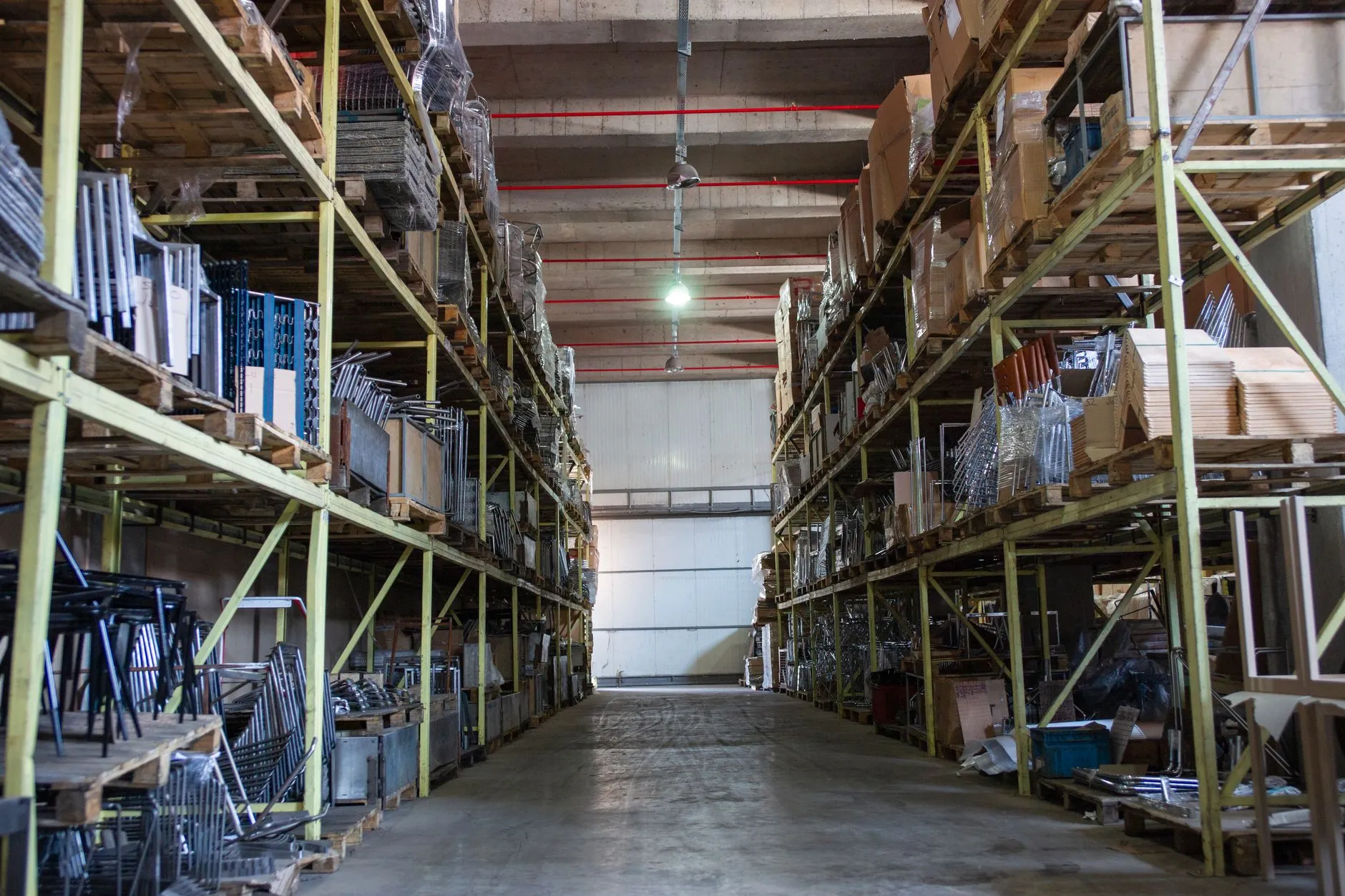
The short answer: The access points were bought before anyone measured, mounted where the conduit already ran, and then the racking layout changed. Handheld scanners now drop between aisles, and no amount of controller configuration fixes a coverage problem. A wireless site survey is a measurement, not a quote — and there are three of them, answering three different questions.
The industry: in a Singapore warehouse, wireless is a production system
There is a category of Singapore business where the wireless network is not an office amenity. It is a piece of production equipment, and when it stops, the process stops with it.
Think of a single-site operation somewhere in the industrial belt — Jurong, Tuas, Woodlands, Loyang, one of the Ang Mo Kio or Kallang industrial estates. Between five thousand and twenty thousand square metres under one roof. A third-party logistics operator, or a light-manufacturing outfit that also holds its own finished goods. Thirty to sixty people on the floor across a day shift and a partial evening shift, plus a small office block at the front for admin, sales and the operations desk.
What runs on the wireless network there is not email. It is handheld barcode scanners in the picking aisles. Terminals mounted on the forklifts. Tablets used for goods-in and for cycle counts. A warehouse management system that expects a scan to commit in under a second because the next scan is already queued behind it. Label printers on the packing benches. Increasingly, a handful of sensors in the temperature-controlled bay, and cameras that someone in operations actually watches.
The office at the front is fine. It has always been fine. The office is drywall, desks and thirty laptops, and it is the easiest wireless environment there is. Ten metres past the roller shutter, the same network is carrying a different job in a building that behaves like a different planet.
The scenario: hardware first, conduit second, racking third
Here is the sequence that produces the problem, and it is remarkably consistent.
The operator moves in, or takes on a second unit, or finally decides the old coverage is not good enough. Someone gets a recommendation — from the landlord's contractor, from the ERP reseller, from a hardware supplier who quoted a number of access points based on the floor area on the lease plan. Access points are bought. Good ones, in most cases; this is rarely a story about cheap hardware.
Then the installer arrives and mounts them where mounting is possible. Not where the radio survey said, because there was no radio survey. Where the existing cable tray runs, where there is an accessible power point, where a ladder fits without moving stock, where the ceiling structure takes a bracket. Every one of those is a reasonable installation decision and none of them is a coverage decision.
Then operations does what operations does. The racking layout changes — a new aisle configuration to fit a customer's pallet profile, a mezzanine over the packing area, bulk storage moved from the back wall to the middle bays because it turns faster there. Stock heights change with the season. A new customer's goods arrive on taller pallets stacked to the top rail.
Nobody did anything wrong at any step. But the network was designed against a floor plan, installed against a building's cable routes, and is now operating in a physical environment that has changed twice since. And the first person to find out is a picker in aisle nine whose scanner will not confirm a pick.
What actually goes wrong when nobody measured
Full bars, but it will not connect
This is the complaint that gets a network blamed for being haunted, and it has a boring, measurable cause almost every time.
A signal-strength indicator on a handheld shows how loudly it can hear an access point. It says nothing about whether the access point can hear the handheld back, nothing about how much of that channel's airtime is already spoken for, and nothing about the noise floor the signal has to rise above. In a warehouse, the gap between hearing a radio and holding a conversation with it is wide, and metal racking is what widens it.
Steel racking reflects. Dense stock absorbs. A long aisle between two full runs of racking behaves a little like a waveguide — it carries signal a surprising distance along its length and almost nowhere across it. Cross the aisle and you can lose a connection you had two metres ago. Scanning at device height, around 1.2 metres, in an aisle whose top rail is at nine metres, is a fundamentally different measurement from a laptop walk-test done at chest height in the cross-dock.
Why buying more access points often makes it worse
When the complaints reach a threshold, the instinct is to add radios. It is the wrong instinct roughly as often as it is the right one, and nobody can tell which without measuring.
The 2.4 GHz band has three non-overlapping channels. Adding access points into a space that is already covered, on channels that are already in use, means the radios spend a growing share of their airtime waiting for each other rather than serving clients. The symptom this produces — everything slows down and drops out around shift change, when device count peaks — looks identical to the symptom it was meant to fix. So another batch gets ordered.
There is also the sticky-client problem, which more radios can worsen. A handheld that associated at the end of an aisle will often cling to that access point well past the point where a closer one would serve it better, because the decision to roam belongs to the client device, not the network. Dense, overlapping coverage gives a stubborn device more opportunities to make a bad choice.
The floor changes, and the RF changes with it
The measurement that matters is the measurement taken under real conditions. A survey walked in a half-empty warehouse in a quiet week tells you very little about the same floor in peak season with every bay full to the top rail. Stock is not a fixed part of a building; it is a variable attenuator that operations moves around for perfectly good commercial reasons.
This is not a reason to skip the survey. It is a reason to book it deliberately — at representative stock levels, at device height, in the aisles, with the racking as it actually is on a working day, and to keep the result as the baseline you compare against the next time the layout changes.
How we think about this: a survey is a measurement, not a quote
Brocent has been running infrastructure work in Asia since 2007, when the company started in Beijing; our headquarters has been in Singapore since 2021, and we have had a Hong Kong office since 2016. Across that time the most consistently misunderstood thing we sell is the wireless site survey — because buyers reasonably assume it is a pre-sales step, a broadly free visit that produces a quote.
It is not. A survey is an instrumented measurement of a physical space, performed by a certified engineer with purpose-built hardware, and it produces evidence. That distinction matters commercially in both directions. It means a survey has a real cost, scoped in engineer-days like any other piece of skilled fieldwork. It also means the result is yours: a documented, defensible baseline that tells you how many radios this building actually needs, where, at what heights, on which channels — rather than a hardware count derived from square footage.
The second thing we would say to an operator who has already bought the hardware: a survey is not an accusation, and it is not too late. You have not wasted the money in most cases. Access points can be moved, re-aimed, re-channelled, power-adjusted, and fitted with directional antennas that concentrate signal down an aisle instead of spraying it into a rack face. Sometimes the answer is that you need four more, not fourteen. Sometimes it is that two of the existing units are fighting each other and one should be switched off. All of those are cheap outcomes, and none of them is available to you without a measurement.
The third thing is the one most likely to save money: there are three different surveys, they answer three different questions, and buying the wrong one is how a survey budget gets wasted.
The three surveys, and the question each one answers
Predictive Survey — designing before anything is mounted
A predictive survey is built in software. An engineer imports the floor plan, calibrates it with real wall and material types, models where signal will land, and produces a first-pass design: recommended access point model, count and placement, RF coverage heat maps covering signal strength, channel assignment and capacity forecast, and an infrastructure requirements list you can hand to a procurement team as a bill-of-materials reference. The tool is the Planner module inside Ekahau AI Pro.
The question it answers is what you should build. Its limitation is honest and important: it predicts, it does not measure. A predictive model is exactly as good as the floor plan and the material data fed into it, which is why it is the right survey for a fit-out that has not happened yet and the wrong survey, on its own, as proof that a finished installation works.
Passive / Active Survey — measuring what is actually there
A passive survey has an engineer physically walk the space while the survey device listens: signal strength, noise, access point presence, co-channel overlap, all without associating to your network or transmitting on it. An active survey has the device actually connect and behave like a client — throughput, latency, packet loss, roaming behaviour as the engineer moves.
With an Ekahau Sidekick 2, a single site walk captures passive survey, active survey and spectrum-analysis data simultaneously, which is why we scope these together rather than as separate visits. Where interference is suspected but not identified, we bring Chanalyzer with a Wi-Spy Dbx to hunt non-Wi-Fi sources — the shrink-wrap machine, the wireless video link, the microwave in the crew room — that no channel change will ever fix. AirMagnet Survey PRO covers RF analysis, access point discovery and security scanning where a client's own standard calls for it.
The question this answers is what is happening now, and why. For the warehouse in this scenario, this is the survey that turns "the scanners are bad in aisle nine" into a list with locations, measurements and remediation attached.
AP-On-A-Stick — verifying the model before the next bulk order
An AP-on-a-stick survey mounts a real access point — usually the exact model you intend to deploy, at the height you intend to mount it — on a telescoping tripod at each planned location, and measures what it genuinely does in that spot. Not what the datasheet says it will do. What it does, with your racking, your stock, your ceiling height.
This is the survey the industry skips and the one that matters most in a warehouse. Our own survey page names it explicitly for large factory and warehouse planning, and the reason is that a warehouse is the environment where predictive modelling is least reliable: rack geometry and stock density are hard to model accurately and they change. A tripod, a real radio and an afternoon are how you find out before the purchase order rather than after.
The question it answers is whether this specific access point, here, at this height, will do what you need. For an operator who has already bought one batch on a recommendation, it is the single best defence against buying a second batch the same way.
The three surveys at a glance
- Predictive Survey — design before purchase. Built in software from your floor plan, before anything is mounted. Answers what to buy and where to put it. Cheapest to run, fastest to turn around, and only as accurate as the plan and material data behind it.
- Passive / Active Survey — diagnose what exists. An engineer walks the live space and measures it. Answers what is actually happening and why, with locations attached. This is the one that converts complaints into a fixable list.
- AP-On-A-Stick — verify the model in place. A real access point on a tripod at each candidate position, at real mounting height. Answers whether this specific unit works in this specific spot, before a bulk order commits you.
None of these is the best survey. They answer different questions, and the expensive mistake is buying the one that answers a question you were not asking.
Which one does a warehouse with hardware already on the wall need?
Usually a passive/active survey first, to establish what the current installation actually delivers and where it fails, and then AP-on-a-stick at the handful of candidate positions the first survey identifies — before any further hardware is committed. A predictive survey earns its place when there is a new unit, a new mezzanine or a significant re-rack coming, and you want the design settled before the cable tray is run.
What a survey costs in effort
We publish our scoping guidance rather than making you ask for it, because the effort is the cost and it is reasonably predictable. These are scoping figures read from our service page on 18 September 2026, not a quote — the actual engagement depends on your building, access arrangements and reporting requirements:
- Passive / active survey of an existing network — approximately 5,000㎡ per man-day.
- AP-on-a-stick survey — approximately 3,000㎡ per two man-days. It is slower because a radio is being physically re-positioned and re-measured at each candidate location.
- Predictive survey where a pre-survey visit is required — approximately 5,000㎡ per two man-days.
- Predictive survey where no pre-survey visit is required — up to 10,000㎡ in a single man-day. This is the fastest path to a validated design, and it is only available when the floor plan and material data are good enough to work from.
For a 12,000㎡ single-site warehouse, that arithmetic puts a passive/active survey of the existing network in the region of two to three man-days of field time, with AP-on-a-stick scoped separately against however many candidate positions actually need physical verification. The point of publishing the ladder is that you can sanity-check any quote — ours or anyone else's — before you sign it.
Report effort is a separate line, and it should be
The fieldwork produces data. Turning data into a document is a different piece of work, and we scope it separately so you are not paying for a report format you do not want:
- Raw data only — no extra cost. You receive the Ekahau survey data and do your own analysis and reporting. Sensible if you have an in-house wireless engineer.
- Ekahau default report — approximately 0.5 man-day. The software generates a standard formatted report.
- Customised template report — approximately 0.5 to 2 man-days, and it requires you to supply a complete Ekahau command template. Half a template costs more than none.
- Manual custom report — one man-day or more, produced by hand against your own template. Effort scales with how complex that template is.
The extras that catch people out
Three of these are genuinely common and worth raising before the quote rather than after:
- Equipment delivery. Specialist measurement hardware such as a Sidekick ships between cities and countries as freight. If the kit is not already in Singapore, there is a real logistics charge attached to getting it there.
- Access point procurement for an AP-on-a-stick survey. The survey needs the specific model you plan to deploy. If we procure it, the asset is yours — and lead times on specific models run anywhere from four to sixteen weeks. That lead time, not the survey, is usually the long pole in a warehouse project schedule.
- Health and safety induction, and working at height. Industrial sites frequently require a site-specific safety induction before an engineer sets foot on the floor, and mounting a tripod-borne access point at real installation height on elevated structures can require working-at-height certification. Neither is difficult; both need to be known about in advance.
Travel is the fourth, and it is mostly a factor when a site is genuinely remote or an engineer is dispatched from another city. AP-on-a-stick work carries more of it because it involves more equipment.
Who walks the floor matters more than which tool they carry
The recognised credential in this field is ECSE — Ekahau Certified Survey Engineer — and our wireless engineers hold it, alongside AirMagnet certification. It is worth understanding why a certification matters for what looks, from the outside, like a walking job.
Two engineers can walk the same aisle and produce different designs, because the discipline is in the interpretation rather than in the collection. Choosing the right receive-signal threshold for barcode scanners rather than for laptops, calibrating attenuation values for steel racking and dense stock rather than accepting a software default for a generic wall, reading a spectrum plot well enough to tell a genuine non-Wi-Fi interferer from an artefact, deciding whether a coverage problem is actually a capacity problem — those are judgement calls. The tooling makes them measurable; it does not make them for you.
The practical version of this for a buyer: ask how many certified engineers will be on your site, not how many the company employs, and ask to see a sample report before you commit. What you are buying is an interpretation.
A real example, honestly framed
One of the survey engagements on our own service page is a manufacturing facility in Beijing: weak coverage across the whole production floor, worst in the shelf- and rack-dense areas, and the visible symptoms were barcode scanning failures, RFID problems and warehouse management system connectivity dropping out. The remedy was not more of the same access point. It was a redesign of model selection and placement for that specific environment, with directional antennas specified for the rack areas to get signal down the aisles rather than into the steel, and an AP-on-a-stick survey used to validate the new design before anything was procured in bulk. After implementation, coverage, signal-to-noise ratio and throughput at each production work location met the client's stated technical requirements.
That is a Beijing plant, not a Singapore warehouse, and we are not going to dress it up as one. What transfers is the shape of the problem and the shape of the answer: rack-dense space, scanner-dependent process, the wrong antenna pattern for the geometry, and a physical verification step inserted before the bulk order rather than after it. If you want the category-level treatment of survey methodology across the region — the bands, the regulatory limits on 6 GHz in Asia, how to choose between provider types — that is covered in our pan-Asia Wi-Fi site survey guide, and this article deliberately does not repeat it.
After the survey: the access points go up, and something has to run them
A survey ends with a plan: these units, at these positions, at these heights, on these channels, with these power settings. Someone mounts them. And then a question arrives that surveys do not answer and that a lot of warehouse operators have never been asked directly.
Who runs them?
Access points are not appliances you hang and forget. They have a control plane — a controller that holds the configuration, pushes firmware, keeps the channel plan coherent as the RF environment shifts, records which radios dropped out and when, and knows whether channel utilisation in the picking aisles is trending the wrong way. Without one, you have a set of independent radios and no history. And an intermittent fault with no history is, by definition, not diagnosable: by the time anyone walks to aisle nine with a laptop, the fault is gone and there is nothing left to look at.
This is the part that turns a one-off survey into an operational answer, and it is what our managed wireless network service exists to do: Brocent hosts and operates the controller, watches uptime and dropouts and PoE faults, applies firmware in batches inside an agreed window with a configuration backup taken first, keeps a change trail, and issues a monthly availability report. Read from our own pricing source on 18 September 2026, the managed UniFi cloud access point controller currently carries a year-end offer of US$1.20 per access point per month on a twelve-month contract, excluding tax, under promo code YE26-UNIFIAP, with that campaign window running to 30 November 2026; outside the window the standing position is a custom quote. Prices move — check the service page rather than this article before you budget against them. If the survey concludes you need additional hardware, current list pricing for the units we typically recommend is on our Ubiquiti pricing page.
One honest constraint: our managed controller service runs on UniFi Network. If the access points already on your wall are a different brand, they cannot be adopted into it. That is a real limitation rather than a sales pitch — and it is a reason to have the conversation before the next batch is ordered, not after.
What we would actually do in this warehouse's position
In rough order, and none of it requires stopping work:
- Book a passive/active survey at representative stock levels, walked at device height in the aisles, not at chest height in the cross-dock. Get the heat map. Keep it.
- Read the issue list before buying anything. Some of what comes back will be free to fix: channel and power changes, one radio switched off, two moved three metres.
- AP-on-a-stick the candidate positions that matter, with the actual model under consideration, before committing to a bulk order — and start the procurement lead-time clock early, because four to sixteen weeks does not compress.
- Decide who operates the control plane at the same time as the hardware decision, not a year later when an intermittent fault has been annoying everyone for two quarters.
- Re-measure when the floor changes. A re-rack, a mezzanine, a new customer's pallet profile, a sustained change in stock height — each of those is a reason to walk it again against the baseline you already have.
For most operators the wireless network is one workstream inside a larger question about who covers the site. If that is where you are, the wireless piece is a sample rather than the whole meal: our managed IT support plans are per-user monthly tiers with network and wireless coverage available as an add-on, and current Singapore rates for both are published on our pricing page — the Network & Wireless add-on is S$113.60 per month covering up to ten devices as read on 18 September 2026, re-banding above that, which is a number worth checking against your real device count rather than your headcount. A warehouse pushes device count up much faster than it pushes headcount up.
Frequently asked questions
We already have access points — do we need a predictive survey or a passive one?
A passive/active survey, almost certainly. A predictive survey models a design from a floor plan and is the right tool before anything is mounted; once hardware is on the wall, what you need is a measurement of what it actually delivers. Predictive comes back into play if you have a new unit, a mezzanine or a significant re-rack ahead of you.
Do you need access to our network to run a survey?
For a passive survey, no — the survey device listens without associating or transmitting, so no credentials are required. That makes a passive survey the easy first step when network access needs an internal approval. An active survey does need to connect as a client, because measuring throughput, latency and roaming requires actually being one. We normally run both in a single walk with a Sidekick 2, so the credential question comes up once.
How long does a survey of a 10,000㎡ warehouse take?
As scoping guidance read from our service page on 18 September 2026: a passive/active survey covers roughly 5,000㎡ per man-day, so a 10,000㎡ floor is in the region of two man-days of field time, plus report effort of half a man-day upwards depending on the format you want. An AP-on-a-stick survey is slower — about 3,000㎡ per two man-days — because a radio is physically re-positioned at each candidate location. Access arrangements, shift patterns and how much of the floor is genuinely walkable all move the real number, which is why this is scoping guidance rather than a quote.
What do we actually receive at the end?
It depends which survey you commissioned. A predictive survey delivers a report with recommended access point model, count and placement, RF coverage heat maps covering signal strength, channel assignment and capacity forecast, and an infrastructure requirements list you can use as a bill-of-materials reference. A passive/active survey delivers the Ekahau raw survey data, a default or customised survey report, and an issue list with technical remediation recommendations attached to locations. An AP-on-a-stick survey delivers a default Ekahau report, the raw data, and access point count and placement remediation recommendations. In all three cases you can take raw data only at no extra reporting cost if you have someone in-house who will analyse it.
Can you survey while we are operating?
Yes, and for a warehouse you generally should. A survey walked in a quiet, half-empty building measures a building you do not operate in. We would rather walk the aisles at representative stock levels during a working shift, because that is the RF environment your scanners live in. What we need is coordination rather than a shutdown — a route that keeps an engineer clear of forklift traffic, and whatever site-specific safety induction your operation requires.
Do we have to buy the access points from you?
No. For an AP-on-a-stick survey we need the specific model you intend to deploy, and you can supply it. If we procure it for you, the asset belongs to you, and you should plan against a four-to-sixteen-week lead time depending on the model. The one thing worth knowing early: our managed controller service runs on UniFi Network, so if you are standardising on something else, the survey still works in exactly the same way but the ongoing operations conversation is a different one.
What if our racking layout changes later?
Then the RF environment has changed and the baseline no longer describes your building. A re-rack, a mezzanine, a new bulk-storage location, or a sustained change in stock height are all reasons to re-measure — usually a much shorter walk than the first one, because you are comparing against a documented baseline rather than starting from nothing. This is the strongest practical argument for keeping the survey data rather than only the PDF: the data is what makes the next survey a comparison instead of a fresh start.
Is a survey worth it if we already have Wi-Fi that mostly works?
If mostly working means a known set of dead spots your team routes around and an intermittent fault nobody has ever caught in the act, then yes — because that is being paid for every shift in re-scans, walked-back pallets and a slow drift in picking throughput that never shows up as an IT incident. If it genuinely works, a survey still gives you a baseline and a defensible answer the next time someone proposes buying more access points. What we would not recommend is commissioning one out of habit on a stable floor that has not changed and is not about to.
Share:
Ready to take action?
Turn these insights into a roadmap for your business.
Book a 15-minute no-obligation consultation with our APAC IT experts. We'll review your current setup and provide a tailored IT roadmap within 24 hours.
Related services
Free Checklist
10 Critical Checks Before Expanding IT to Greater China
PIPL compliance, network segmentation, bilingual helpdesk setup, and more — everything your IT team needs before Day 1 in China.
Request the checklist →📬 Monthly Asia IT Insights
China compliance updates, cybersecurity alerts, and IT tips for APAC teams — once a month.
No spam. Unsubscribe anytime.